# Automation Tools
#### What version of Aegisub do I need?
Please refer to the [Aegisub Setup](https://wiki.holoresorttls.org/books/subbing-guidelines/page/aegisub-setup) page for details on the arch1t3cht fork of Aegisub, which has first-class support for automation tools.
Aegisub 3.4.0 and later also has support for DependencyControl, but you have to install with `Full installation`.
#### DependencyControl Tools
These are tools that you can install once you have arch1t3cht/Aegisub or Aegisub 3.4.
`Automations > DependencyControl > Install Script`
[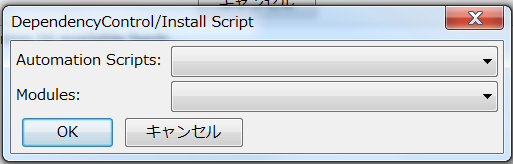](https://wiki.holoresorttls.org//uploads/images/gallery/2025-06/qJGxgFRcnU4JF3U4-unnamed.png)
Here are some useful tools and the basics on how to use them. They are also known as “scripts.”
****ASSWipe****
- Cleans + Sorts your scripts and removes unnecessary lines, reducing file size.
- This is more useful in soft-subbing
****Blur and Glow (Double Border)****
- This allows you to automatically add double borders to your subtitles
- This also provides as the name says, Blur and Glow.
****Gradient by Character****
- This makes your line go through a gradient by changing the colors of each character gradually.
- It can only make a gradient horizontally. Vertically if vertical Japanese.
- This is commonly seen and used in ****youtube captions****.
- Just add **at least** 2 colors to your line.
[](https://wiki.holoresorttls.org//uploads/images/gallery/2025-06/sIULzKulJNVAz46W-unnamed.png)
- Run the script
****Gradient Everything****
- This is a more versatile yet complex version of gradient which gives you the ability to gradient horizontally or vertically on the screen.
- You need two same lines separately, yet each having its colors.
[](https://wiki.holoresorttls.org//uploads/images/gallery/2025-06/scaled-1680-/VFF8Skb3UcxGTzK1-image10.png)
- You also need to either input a clip border or have all lines have the same pos.
- Run the script and you will be given an interface where you choose how you’d want to gradient the line.
- It will keep already written tags and still gradient horizontally/vertically.
****HYDRA****
- Allows you to mass add tags on lines.
- Clicking “Load Full” gives you a lot more options.
****Hyperdimensional Relocator****
- Yes.
- Shit tons of useful features. Here’s a [video](https://youtu.be/EwWLntUlLrE) that shows some of it.
****Masquerade****
- There’s a lot of tools that can turn clips into drawings but this one does it best.
- Simply draw a clip, select “from clip” mask type, and click “Masquerade”.
****Shapery****
- Made to replicate most of the tools used in Adobe Illustrator.
****More may be added soon.****
Link to manuals for certain tools, including Blur and Glow, HYDRA, Colourise, and Hyperdimensional Relocator:
[https://unanimated.github.io/ts/scripts-manuals.htm](https://unanimated.github.io/ts/scripts-manuals.htm)
#### Off the Shelf Tools
These are some tools that aren’t in DepCon but can still be accessible through other means. Mainly GitHub.
- Perspective
- Chloro
- Centipede
- More may be added soon.