Hardsubbing Subtitles
(also known as “burning-in” subtitles)
petzku's Encode Clip (recommended method)
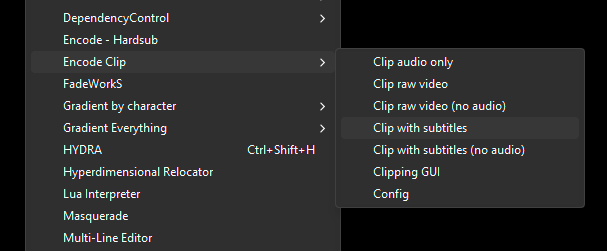
This uses an Aegisub script called Encode Clip to hardsub video. This provides the most color-accurate and fastest encoding compared to older methods. The drawback is that it uses mpv instead of ffmpeg to encode.
This is the recommended method for all HoloResort Translations subbers. It is highly encouraged that you use this method for hardsubbing. Consult with your team lead if you need to use a different method.
Installation:
- Install mpv here: https://mpv.io/installation/
- Open Aegisub and click
Automation > DependencyControl > Install Script. - On the
Automation Scriptsdropdown, look forEncode Clip, select it, and then clickOK.
How to use:
- Save your ASS file.
- Create a new line encompassing the lines to be subbed and then select it, or select the multiple lines to be hardsubbed.
- Click
Automation > Encode Clip > Clip with subtitles. - Done!
When installing mpv, it must also be installed on your PATH. If you encounter an issue with mpv not being found, go to Automation > Encode Clip > Config and then set the mpv location manually. For more information on Encode Clip, go here.
lyger’s Clipper Method
Installation and usage can be found here.
- When hardsubbing, make sure your raw video is MKV. If not and what you used is an MP4, your timing will be pushed back by 1 frame.
- Hardsubbing from MKV to MP4 will still push back by 1 frame.
- You use Clipper to clip a part of the video.
- Useful for testing tag animation in hardsubbed form.
- Just set the timing to cover the part you wanted then run the script!
Modded HLR Clipper
- https://github.com/Sheer-Curiosity/HLR-Clipper/releases/tag/v1.0
- Fixes some things that the HLR team specifically asked for
- Just put the .lua in the same place you put lyger’s clipper!
Ragtag Method
Simply use ffmpeg in the CMD prompt to hardsub. Used by Aonahara peeps.
ffmpeg -i “[input video].mp4” -c:a copy -vf subtitles=“[subtitle file].ass” -crf 17 “[output video].mp4”
- Madekuji’s GUI to write the cmd line for you: https://mdkj.dev/hardsubcode/
- This only hardsubs the entire video.
- A quick and simple way of hardsubbing video when you just want to get it done.