
Tips and Shortcuts
Keyboard Shortcuts
- A - Slide the audio bar to the Left.
- S - Plays the audio entirely.
- D - Plays the last 500ms of the audio.
- F - Slide the audio bar to the right.
- G/Enter - Commit the timing for the line
- Z - Go to the previous line
- X - Go to the next line
- C - Add a set amount of lead-in to the timing (default is 300ms)
- V - Add a set amount of lead-out to the timing (default is 300ms)
Changing Settings
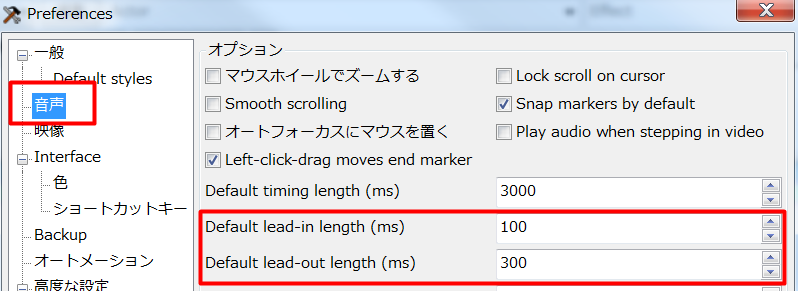
You can change the amount on the settings (Alt+O)
You can check “Snap markers by default” to easily manage blinking/overlapping.
Timing Post Processor
You can use the “Timing Post Processor” to automatically fix and clean out missed blinkings.
However, this does not work if you are working with a collab stream where multiple people are speaking.